

Your Content Marketing Team
Sight AI uses a team of specialized AI agents that work together to create your articles. Think of them as your virtual content marketing team — each with a specific role and expertise.
The key difference from other AI tools: You can customize instructions for each agent individually, giving you precise control over every aspect of your content creation process.
Meet Your AI Agents
Navigate to AI Agents in your dashboard to see your content marketing team. Each agent handles a specific part of the article creation process:
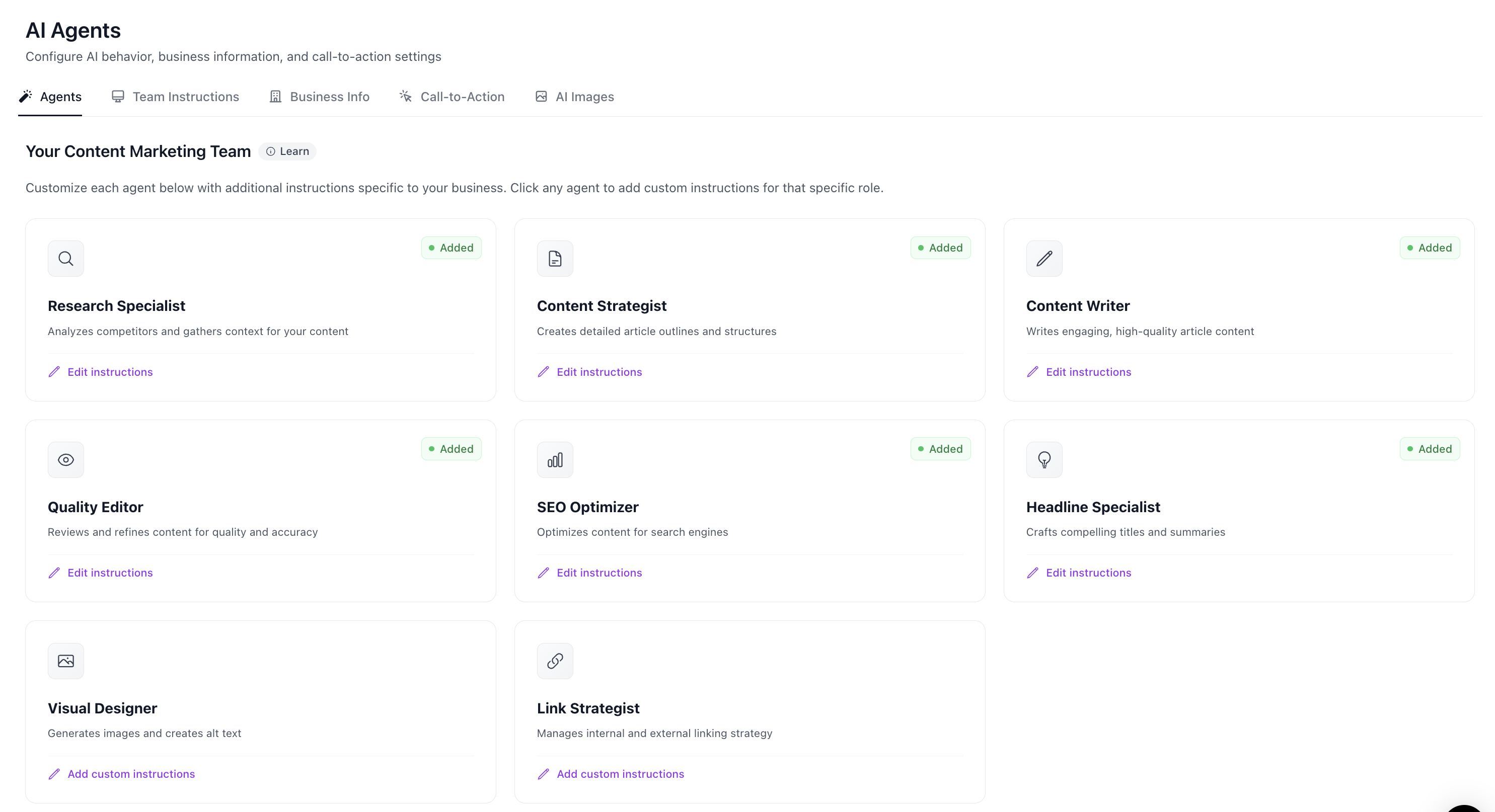
🔍 Research Specialist
What they do: Analyzes competitors and gathers context for your content
- Researches your topic from trusted sources
- Identifies key points competitors are covering
- Gathers statistics, data points, and expert insights
- Ensures your content is factually grounded
Customize when: You want research to focus on specific sources, industries, or types of data (e.g., "Always prioritize peer-reviewed studies" or "Focus on B2B SaaS examples").
📋 Content Strategist
What they do: Creates detailed article outlines and structures
- Analyzes keyword intent and search expectations
- Plans the heading hierarchy and content flow
- Determines which sections to include
- Ensures logical organization that serves reader needs
Customize when: You have specific structural preferences (e.g., "Always include a FAQ section" or "Start with a quick summary for busy readers").
✍️ Content Writer
What they do: Writes engaging, high-quality article content
- Drafts the main body content section by section
- Follows the outline structure from the Content Strategist
- Incorporates research findings naturally
- Maintains consistent tone and voice throughout
Customize when: You want to control writing style, tone, or specific content requirements (e.g., "Use a conversational, friendly tone" or "Always use Title Case for H2 headings").
👁️ Quality Editor
What they do: Reviews and refines content for quality and accuracy
- Checks for repetitive or redundant content
- Identifies inconsistencies in tone or messaging
- Ensures claims are properly supported
- Suggests improvements for clarity and impact
Customize when: You have specific quality standards (e.g., "Flag any sentences over 30 words" or "Ensure every claim has a supporting example").
📈 SEO Optimizer
What they do: Optimizes content for search engines
- Ensures proper keyword placement and density
- Optimizes heading tags and content structure
- Improves content readability scores
- Adds semantic relevance for target keywords
Customize when: You have specific SEO requirements (e.g., "Target keyword should appear in first 100 words" or "Include LSI keywords naturally").
💡 Headline Specialist
What they do: Crafts compelling titles and summaries
- Generates SEO-optimized, click-worthy titles
- Creates meta descriptions that drive clicks
- Writes article summaries and excerpts
- Ensures headlines match search intent
Customize when: You want specific headline styles (e.g., "Never use clickbait tactics" or "Always include the year in the title when relevant").
🎨 Visual Designer
What they do: Generates images and creates alt text
- Creates featured images that capture attention
- Generates in-body illustrations for sections
- Writes descriptive, SEO-friendly alt text
- Ensures visual consistency with your brand
Customize when: You want specific image styles (e.g., "Use minimalist, professional illustrations" or "Avoid images with text overlays").
🔗 Link Strategist
What they do: Manages internal and external linking strategy
- Identifies opportunities for internal links to your existing content
- Plans natural anchor text placement
- Suggests authoritative external references
- Ensures link distribution looks natural
Customize when: You have specific linking requirements (e.g., "Always link to our product pages when mentioning features" or "Limit external links to 3 per article").
How to Customize Your Agents
Customizing your agents is simple and gives you powerful control over your content:
- Go to AI Agents in your dashboard
- Click on any agent card to open the customization panel
- Click "Edit instructions" (or "Add custom instructions" if none exist)
- Enter your specific requirements in plain English
- Save your changes
Your custom instructions are applied to every article generated for that site. You'll see an "Added" badge on agents that have custom instructions.
Example Instructions
Here are some examples of effective custom instructions:
Content Writer:
- "Use a conversational, friendly tone. Avoid jargon unless explaining it."
- "Always use Title Case for all H2 and H3 headings."
- "Include practical examples from real-world scenarios."
- "Write for a technical audience familiar with software development."
Research Specialist:
- "Focus on B2B SaaS examples and case studies."
- "Prioritize data from the last 2 years."
- "Include competitor analysis when relevant."
Headline Specialist:
- "Keep titles under 60 characters for full display in search results."
- "Never use sensationalist or clickbait language."
- "Include the primary keyword near the beginning of the title."
Team Instructions vs. Agent Instructions
Sight AI offers two levels of content customization:
Team Instructions (Global)
Found in the "Team Instructions" tab on the AI Agents page. These apply to all agents and are perfect for:
- Brand voice and tone guidelines
- Company-specific terminology
- Topics to always include or avoid
- General writing style preferences
Agent Instructions (Role-Specific)
Set on individual agent cards. These apply only to that specific agent and are perfect for:
- Role-specific requirements (e.g., headline format, image style)
- Technical specifications for that phase of content creation
- Overriding or refining general team instructions for specific purposes
How they work together: Team instructions are applied first, then agent-specific instructions refine them. Agent instructions take priority when there's a conflict.
Business Info & Call-to-Action
Beyond instructions, you can also configure:
- Business Info: Help agents understand your company, products, and target audience
- Call-to-Action: Define CTAs that should appear in your content
- AI Images: Configure image generation preferences
These settings are found in the tabs alongside "Agents" on your AI Agents page.
Troubleshooting & Altering Your Content
You have complete control over how your articles are written. If something isn't working the way you want, here's how to fix it:
Content Doesn't Match Your Tone
Problem: Articles sound too formal, too casual, or just "off" from your brand voice.
Solution:
- Go to AI Agents → Team Instructions
- Add clear tone guidelines: "Write in a conversational, approachable tone. Avoid corporate jargon."
- For more control, also add instructions to the Content Writer agent
Structure Isn't Right
Problem: Articles are missing sections you want, or include sections you don't need.
Solution:
- Customize the Content Strategist agent
- Add instructions like: "Always include a Key Takeaways section at the end" or "Never include a FAQ section unless specifically requested"
Content is Too Shallow or Too Deep
Problem: Articles don't go into enough detail, or go too deep for your audience.
Solution:
- Customize the Content Writer agent
- Add instructions like: "Write for beginners who are new to this topic" or "Assume the reader has intermediate technical knowledge"
- You can also adjust in Team Instructions with: "Our audience is [describe audience]"
Headings or Formatting Issues
Problem: Heading capitalization, formatting, or style doesn't match your preferences.
Solution:
- Customize the Content Writer agent
- Be specific: "Use Title Case for all H2 headings" or "Use sentence case for H3 and below"
SEO or Keyword Issues
Problem: Keywords aren't placed where you want them, or SEO optimization feels off.
Solution:
- Customize the SEO Optimizer agent
- Add instructions like: "Include the primary keyword in the first paragraph" or "Don't over-optimize — prioritize natural reading"
Missing Brand or Product Context
Problem: Articles don't reference your products, services, or brand appropriately.
Solution:
- Go to AI Agents → Business Info tab
- Fill out your company description, products/services, and target audience
- Add specific mentions in Team Instructions: "When relevant, mention our product [Product Name] as a solution"
Internal/External Linking Issues
Problem: Too many/too few links, or links aren't going to the right places.
Solution:
- Customize the Link Strategist agent
- Be specific: "Limit internal links to 5 per article" or "Always link to our pricing page when discussing costs"
Image Style Issues
Problem: Generated images don't match your brand aesthetic.
Solution:
- Go to AI Agents → AI Images tab to configure global image settings
- Customize the Visual Designer agent for more specific control
- Add instructions like: "Use clean, minimalist illustrations with blue and white colors"
Best Practices
- Start with Team Instructions — Get your baseline right before customizing individual agents
- Be specific — Vague instructions lead to inconsistent results. "Use Title Case" is better than "format headings nicely"
- Iterate — Generate a test article, review it, then refine your instructions
- Don't over-instruct — Too many conflicting instructions can confuse the agents. Focus on what matters most
- Use Business Info — The more context agents have about your business, the better the content